
AI Disclaimer
This project was NOT made using AI. All code was created by me, the docker files, the documentation, comments, all of it. There were some things I asked AI about to clarify but I view that as akin to asking a professor about something rather than it being used as a development tool.
AI Summary of the Project
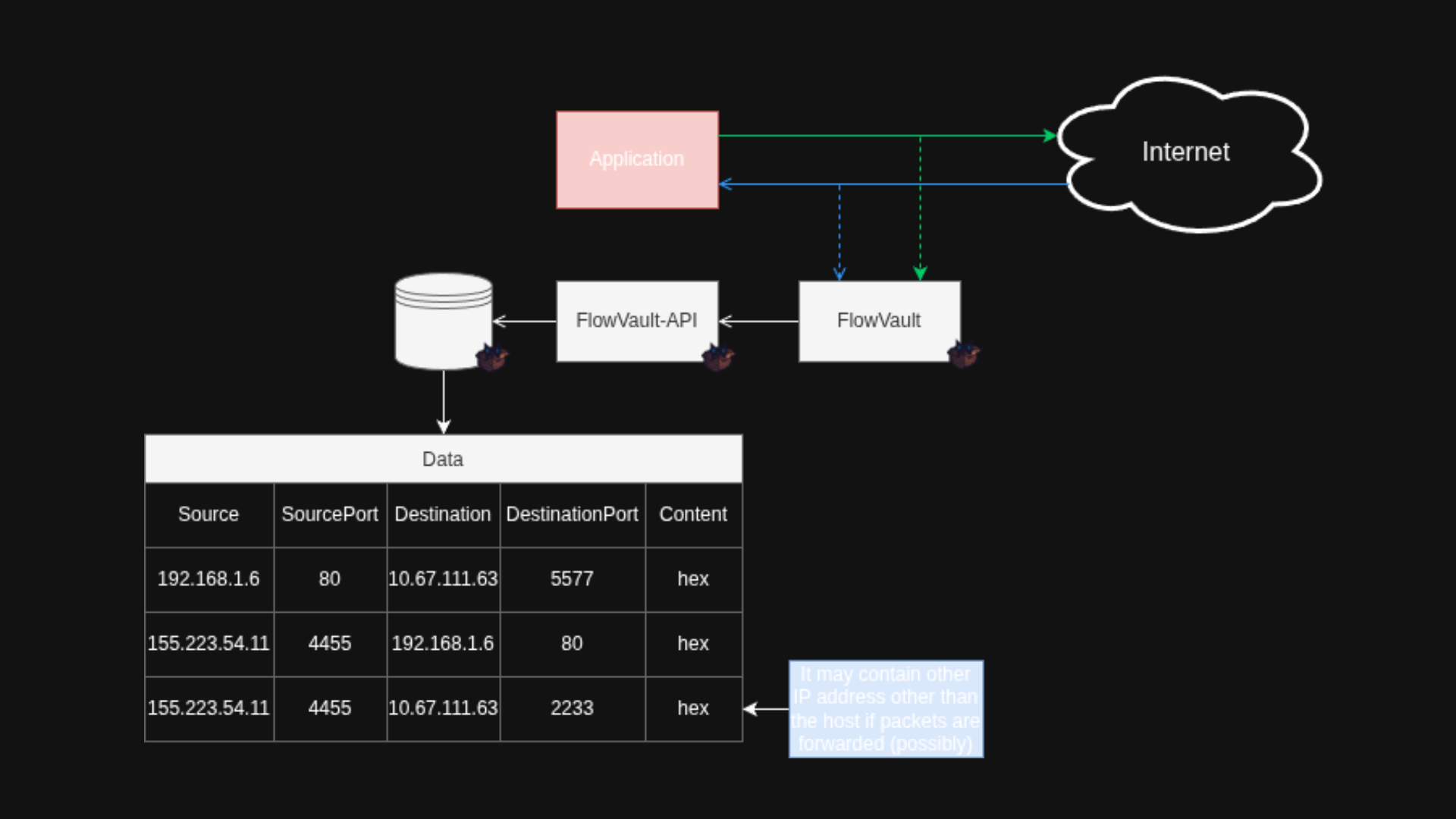
FlowVault is a TCP traffic capture application developed for a university project, Mapping the Monero Network. It records source and destination IP addresses, ports and packet content, then sends those records through an API into PostgreSQL for subsequent analysis.
The project separates the sniffer, called FlowVault, from FlowVault API and database storage. Captured data has been parsed and manipulated to produce a visualisation, while the overall project remains unfinished.
Status: In progress · Core stack: Python, Scapy, FastAPI, SQLModel, PostgreSQL, Docker, uv · Analysis and visualisation stack: Jupyter, pandas, GeoJSON, deck.gl
Problem and scope
I needed a packet capture tool that could support data collection across multiple nodes for the Monero mapping project. My requirements included database-backed records and convenient access to up-to-date data files for analysis.
I chose to build an application around those requirements because the existing options I considered did not provide the combination I wanted. FlowVault provides the traffic collection and storage foundation for the wider mapping work.
The deployment combines local and cloud environments. Testing required a two-node setup, making communication between components and differences between local and deployed operation important parts of the project.
Architecture
| Component | Responsibility |
|---|---|
| FlowVault sniffer | Capture TCP traffic and send records containing endpoint details and content to the API |
| FlowVault API | Receive captured records and write them to the database |
| PostgreSQL | Store traffic records for subsequent analysis |
The collection path runs from the sniffer to the API and then into PostgreSQL. Analysis follows collection: the recorded data is parsed and manipulated for visualisation.
The sniffer and API are reusable components, with containers forming part of the deployment workflow. The project uses uv to manage its Python monorepo. Loguru provides application logging.
Implementation challenges
One difficult deployment issue was getting Python application logs to appear in Docker. Missing logs made failures difficult to investigate and required me to learn the Python-specific container configuration needed for the application to work and remain debuggable.
Testing was also more involved than running a single application locally. The project required two nodes, and behaviour differed between local testing and deployment. Working through those differences meant coordinating the components while managing the time and resources available for the university project.
Verification and outcomes
Testing involved the two-node setup in local and deployed environments. Application logs supported debugging, particularly when investigating container behaviour.
The concrete outcome was being able to parse and manipulate collected data into a visualisation for the mapping work. This connected traffic collection and database storage to a usable analysis workflow.
The overall application remains unfinished.
What I learned
FlowVault gave me practical experience with a microservices approach by separating capture and API responsibilities into reusable components. It also developed my understanding of Python monorepo management with uv.
The deployment work reinforced the importance of usable application logs and testing components together across environments. Producing the visualisation connected those infrastructure lessons with the data analysis needs that motivated the project.